




































































How to schedule your menopause provider visit



With your Progyny menopause benefit, you have access to a network of leading menopause providers. You’ll work together to develop a personalized plan of care to meet your needs and help you feel your best.
Here’s how to schedule a visit with a menopause provider using your Progyny member portal or app.
1. Set up your Progyny account.
You’ll use your Progyny member portal or app to:
- Schedule and manage provider visits
- Send questions to your provider
- Message your Progyny Care Advocate for coaching and support
How to set up your Progyny account
Go to the Progyny member portal and select Create an Account. You can also do this from the Progyny app — get it from Google Play or the Apple Store.
- Your user ID is the email you used to enroll.
- Create a new password.
- Have your health insurance card ready and follow the prompts.
We keep your data secure. To authenticate your account, you can choose to get a text message or use an authentication app. We’ll also ask you to verify your email address.
2. Schedule your menopause provider visit.
We’ve partnered with leading menopause providers to support you. You may use a local provider or a telehealth provider.
How to schedule with a local provider
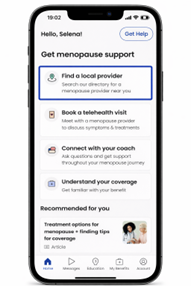
- Sign into your Progyny member portal or app.
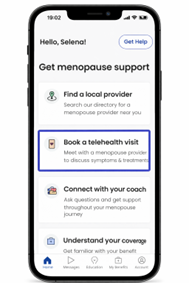
- Select Find a local provider.
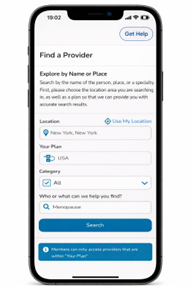
- Use the provider search tool to find in-network providers near you.
How to schedule a telehealth visit
- Sign into your Progyny member portal or app.
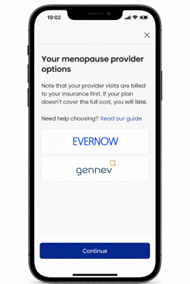
- Select Book a telehealth visit.
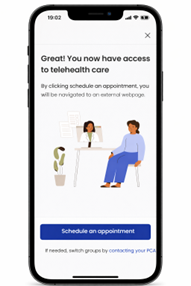
- Choose your preferred provider. You’ll be taken to the menopause provider’s scheduling system.
- After scheduling, you’ll be asked to set up an account with the provider. Use this to log into your telehealth visit.
If you have any questions, call your Progyny Care Advocate at 888-597-5065. We’re here Monday–Friday, 9 am–9 pm EST (6 am–6 pm PST). You can also send a secure message through your Progyny member portal or app.
The post How to schedule your menopause provider visit appeared first on Progyny.
What's Your Reaction?
 Like
0
Like
0
 Dislike
0
Dislike
0
 Agree
0
Agree
0
 Disagree
0
Disagree
0
 Excellent
0
Excellent
0
 Useful
0
Useful
0
 Great
0
Great
0